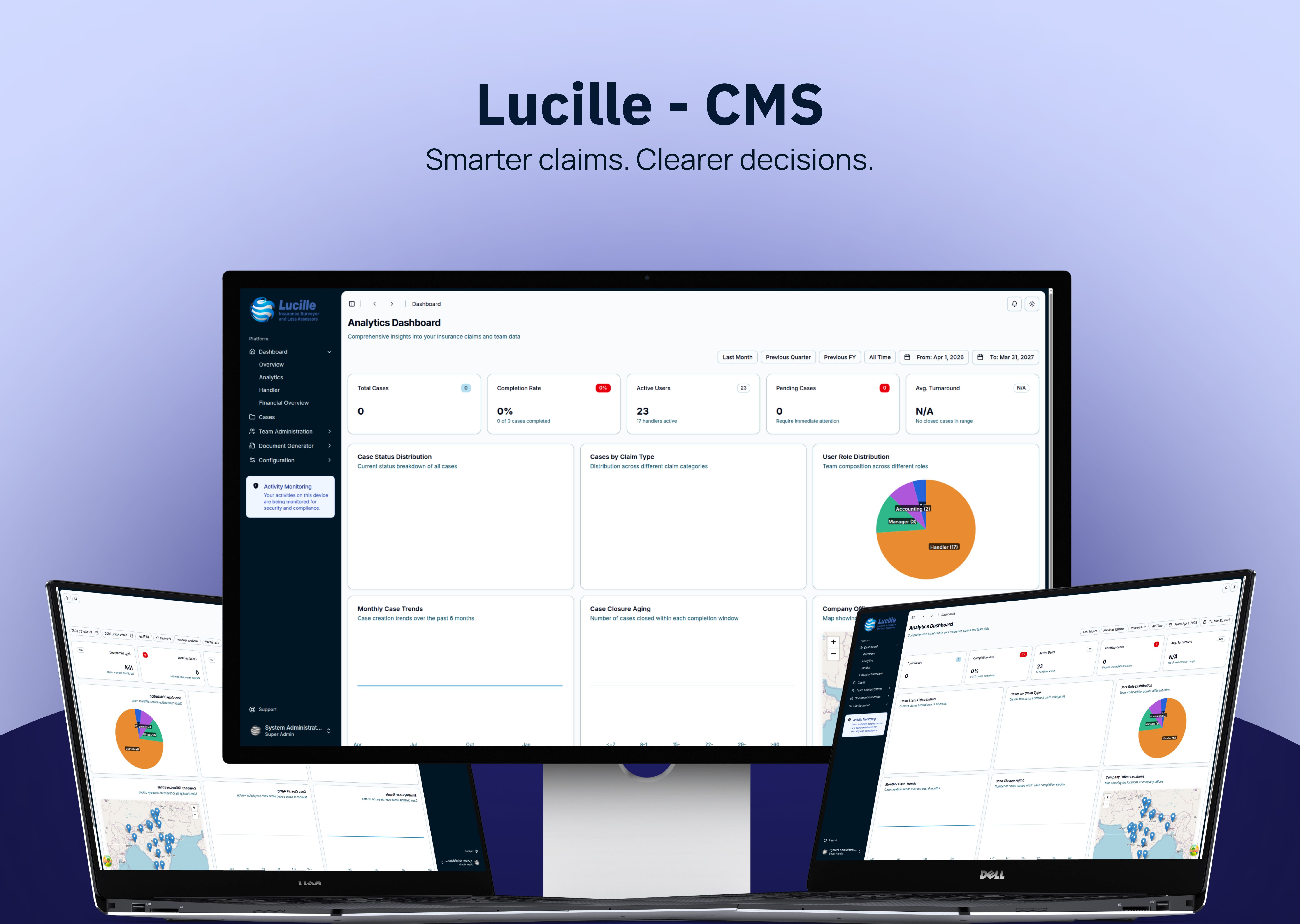
An insurance surveyor firm needed a single system to manage claims end-to-end without ever putting a record on the public internet — and needed nine years of case history, more than 15,000 claims dating back to 2016, carried over without loss. We built a desktop claims management system that verifies the device is on an authorised office network before it opens, gives four staff roles their own dashboards and permissions, generates a six-part case reference automatically, and logs every status change to an audit trail.
Who This Is Built For
- Insurance surveyor and loss-assessor firms handling claims for multiple insurers
- Third-party administrators running multi-role back-office claims operations
- In-house claims departments where claim structure varies by insurer, office and financial year
- Any team where claims data is not permitted to leave the organisation's own network
Project Overview
Stacknyu designed and built a claims management system for an insurance surveyor firm — a secure desktop application that helps insurance teams manage claims from intake to closure. Running on a Wails (Go) desktop shell with a SvelteKit interface and a PocketBase backend, the platform enforces network-level access control, role-based permissions and a complete audit trail, so sensitive claims data never leaves the organisation's infrastructure.
Challenges & Objectives
- Enterprise-Grade Security
- Challenge: Insurance claims are highly sensitive, so the system had to work only inside authorised office networks — with nothing exposed outside the organisation.
- Objective: Enforce network-level access control at launch, role-based permissions throughout, and a traceable audit trail for every case action.
- Complex Case Lifecycles
- Challenge: Claims differ by insurance company, claim type, office and financial year — each with its own fields, statuses and deadlines.
- Objective: Build a flexible case engine with automatic reference numbering and dynamic forms that adapt to each claim.
- Four Distinct User Roles
- Challenge: Super Admins, Managers, Handlers and Accounting staff all need different views and capabilities.
- Objective: Give each role its own dashboard and permission set so everyone sees exactly what they need.
Our Approach
- Desktop-First, Network-Restricted Architecture
- A Wails v2 (Go) desktop application verifies the device is on an authorised office subnet before launch and uses native OS notifications for access control.
- Role-Based Interfaces
- Separate navigation, dashboards and permissions for Super Admin, Manager, Handler and Accounting roles — from full system configuration down to financial overview and case viewing.
- Analytics-Driven Dashboards
- Interactive dashboards with KPIs, trends and charts built on LayerChart (d3), plus a dedicated financial overview for the Accounting team.
- Automatic Reference Numbering
- Every case receives a unique reference generated automatically from the company, claim type, office, loss location, financial year and sequence — no manual numbering errors.
- Configuration Without Code
- Super Admins manage master data — insurance companies, offices, claim types, locations, financial years, departments, deadlines and document templates — directly in the app.
- Document Generation and Full Audit Trail
- A built-in document generator produces case-specific documents, and every status change or access grant is recorded in the audit trail for full accountability.
Why Desktop Instead of a Web Portal
Almost every guide to claims software concludes that cloud is the right answer. For most insurers it is. This project was the case where it wasn't.
The constraint was absolute: claims records could not be reachable from the public internet. A web portal — even one behind a VPN and SSO — still means the application is listening on a network someone outside the building can reach. The client's risk position did not allow that.
A desktop application inverts the problem. The Wails v2 shell checks the device's subnet before the interface ever renders. If the machine isn't on an authorised office network, the app does not open. There is no login screen to brute-force from outside and no public endpoint to scan, because there is no public endpoint. Access control happens before authentication rather than after it.
The trade-offs are real and worth stating plainly. There is no remote work: staff must be in an authorised office. Updates ship as application releases rather than a server deploy. Cross-device continuity has to be designed in rather than assumed. For a back-office team that already works on-site, none of these cost anything. For a distributed claims operation, all three would be disqualifying.
The honest rule: choose network-restricted desktop when the data cannot leave the building and the users don't either. Choose cloud in almost every other case.
Technologies Used
- Desktop Shell: Wails v2 (Go) — a cross-platform desktop application with network access control and native notifications.
- Frontend: Svelte 5 + SvelteKit with Tailwind CSS v4, TanStack Query, Superforms and Zod for a fast, type-safe UI.
- Backend & Data: PocketBase with typed collections and role-based permissions.
- Analytics & Maps: LayerChart (d3) dashboards and Leaflet location maps.
Outcome
The system is in daily use across Super Admin, Manager, Handler and Accounting teams, carrying a full case history of more than 15,000 claims migrated from 2016 to the present with zero data loss. Every new case receives an automatically generated six-part reference, removing manual numbering errors entirely. Super Admins configure eight categories of master data — insurance companies, offices, claim types, locations, financial years, departments, deadlines and document templates — without a developer. Every status change and access grant is written to an audit trail. And no claims record leaves the office network, because the application will not launch outside it.
Related Reading
Cost to Build a Custom Claims Management System · Claims Software for Surveyors and Loss Assessors · On-Premise vs Cloud Claims Software · Designing a Claim Reference Numbering Scheme